A letter-lattice pattern, drawn as a sketch. Moving the pointer over it, or dragging on a touch screen, builds the sketch into solid luminous tubes; the Build it button does the same for the whole drawing.

BatLabs · Robotics & engineering
You sketch it. We build it.
We’re BatLabs. Software, electronics, hardware and design, working as one. Bring us a challenge and we’ll turn it into something you can hold, test and take further.
- Sketched by
- You
- Built by
- BatLabs
One of the first programmable machines was a loom.
Its strength was the connection between code and craft.
At BatLabs, we weave disciplines into things that work.
Jacquard’s punched-card loom, 1804.
On the bench · 7 projects
Ideas, made tangible.
Seven projects across software, electronics, mechanics and design. We take ideas from a first concept all the way to a working prototype. Open any project to see how it was designed and built.
- 1. CONCEPTThe idea, modelled in 3D and ready to develop.
- 2. DESIGNEngineered in CAD, part by part, ready to make.
- 3. HARDWAREParts made and assembled into a physical build.
- 4. PROTOTYPEBuilt, wired and running on the bench.
Have an idea at any of these stages? Work with us
- SoleSenseTactile sensing / Mechanical designTactile sensing / Mechanical designStage 2 of 4: Design — R07 · Full CAD assembly
- Ambient ComfortWearable sensing / Human-centred designWearable sensing / Human-centred designStage 1 of 4: Concept — Wearable concept
- Braille BoxAccessible communication / Embedded systemsAccessible communication / Embedded systemsStage 2 of 4: Design — R3 · Full CAD assembly
- HimayaEngine monitoring / Embedded systemsEngine monitoring / Embedded systemsStage 4 of 4: Prototype — Working sensor prototype
- InMoov headHumanoid robotics / AnimatronicsHumanoid robotics / AnimatronicsStage 4 of 4: Prototype — Assembled and moving
- Agricultural DroneAgriculture / Aerial roboticsAgriculture / Aerial roboticsStage 3 of 4: Hardware — Airframe built
- High TideMarine systems / Controls & simulationMarine systems / Controls & simulationStage 1 of 4: Concept — Digital prototype
SoleSense
A handheld instrument for exploring pressure and vibration testing: interchangeable heads, a replaceable filament cartridge, and a magnet that moves with the carriage past a fixed Hall sensor.
- What we built
- The complete R07 assembly in 83 parts, from the interchangeable heads to the Hall-effect sensing, with a narrated walkthrough.

Engraved line drawing of SoleSense R07 (full CAD assembly). Moving the pointer over the drawing, or the Show in colour button, reveals the true-colour model.
Ambient Comfort

Engraved line drawing of Ambient Comfort (wearable concept): a concept model of the wearable. Moving the pointer over the drawing, or the Show in colour button, reveals the true-colour model.
An EEG headset concept that brings electrodes, skin sensors and modular electronics into one wearable study for an adaptive comfort system.
- What we built
- A fully proportioned model of the band, its sensor pods, the EEG electrode positions and the skin sensors.
Braille Box
An offline communication terminal designed around speech, six-key braille input, a refreshable tactile reading surface and a staff-facing display.
- What we built
- The R3 mechanical design in 141 parts: the housing, Perkins-style keys, a 48-pin reading surface and the display mechanism.

Engraved line drawing of Braille Box R3 (full CAD assembly). Moving the pointer over the drawing, or the Show in colour button, reveals the true-colour model. While the braille input is focused, the drawing looks down on the 48-pin reading surface and raises the pins of each embossed cell.
Himaya

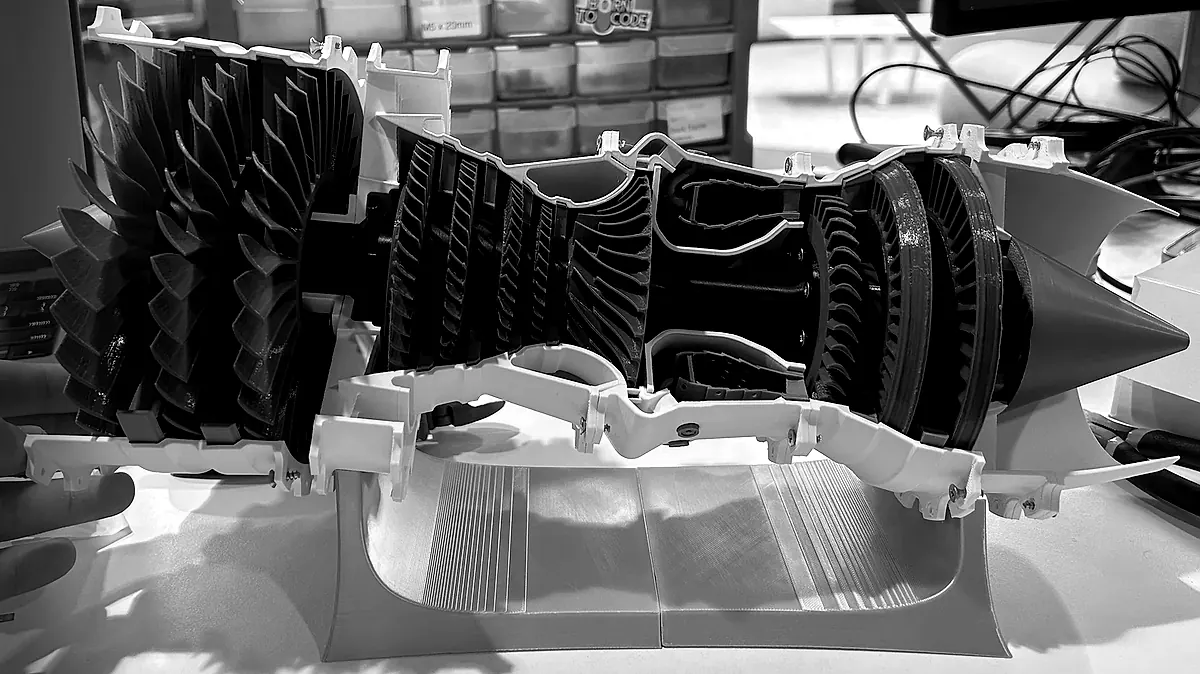
Engraved line drawing of Himaya (working sensor prototype): our 3D model of the engine on the bench. Moving the pointer over the drawing, or the Show in colour button, reveals the true-colour model.
A sensor-equipped turbine model and local dashboard: a test bed for listening to acoustic, rotational and vibration signals around engine distress.
- What we built
- A printed turbine on the bench with a microphone, an optical rotation sensor, a vibration switch and a temperature and humidity sensor, all running on an Arduino UNO Q.
Our 3D model of the engine on the bench.
Himaya · Award
Best Innovative Hack.
Himaya won Best Innovative Hack at INSPIRE.
We modelled the trophy in 3D from the original. Move over the drawing to reveal its gold finish.

A photo-based 3D reconstruction of the gold Best Innovative Hack trophy: ornamental handles, a faceted cup, a tiered lid and a burgundy plinth.
InMoov head
A humanoid robot head whose eyes turn and jaw opens on servos: the open-source, 3D-printable InMoov i2 design, assembled on our bench.
- What we built
- The full head, printed and assembled on our bench, with servo-driven eyes and jaw.
The 3D model shows the InMoov i2 design we built.
Our build of the open-source InMoov i2 head by Gaël Langevin (CC BY-NC 3.0).
Engraved line drawing of InMoov head (assembled and moving): the open-source InMoov i2 design we built. Moving the pointer over the drawing, or the Show in colour button, reveals the true-colour model. Its eyes follow the pointer and keyboard focus, and the Say hi button moves its jaw.
Agricultural Drone

Engraved line drawing of Agricultural Drone (airframe built): modelled from photographs of our airframe. Moving the pointer over the drawing, or the Show in colour button, reveals the true-colour model.
A six-arm agricultural drone that brings a carbon-fibre frame, six motor assemblies, a central electronics stack and tall landing gear together in one machine.
- What we built
- A six-arm carbon-fibre airframe with its motor assemblies, wiring, a central electronics tray and twin landing skids.
Our 3D model is built from photographs of the real airframe.
7 of 7 Marine systems
Controls & simulation
HIGH TIDE
Fixed submerged sections. Two possible exits.
Keep water flowing.
Give jellyfish an exit.
A marine system exploring how controlled bubble sections can guide jellyfish away from seawater intakes.
- What we built
- A working transport model and its control logic, run through 165 scenarios.
3D printing.
Alongside our engineering work, we design and 3D-print sculptures, functional parts and custom pieces. Pick one to see it on the print bed.
On the bed P01–P04
Digital sculpture / 3D printing
Marmellata
A 175 mm portrait sculpture of two bakers embracing, modelled as one connected, printable piece.
Stage 2 of 4: Design — 175 mm · Print-ready model
Shown in colour for display.
Badges / multi-part prints
42 Proctors & Transcenders badges
Badges we designed and printed for 42’s Proctors — gold, silver and bronze — and its Transcenders. Each one is three prints that click together: a black shell, a coloured inlay and a white backer.
Stage 3 of 4: Hardware — Printed · 4 badges
Desk stand / 3D printing
Batman headphone stand
A 220 mm stand that keeps a pair of headphones on the desk, printed in one piece in black PLA.
Stage 3 of 4: Hardware — 220 mm · Printed
Remodelled by BatLabs after ErDo’s design on MakerWorld.
Figure / multi-colour printing
Red Hood bust
A 194 mm bust on its base, printed in four colours: grey, dark red, red and white.
Stage 3 of 4: Hardware — 194 mm · Printed
Remodelled by BatLabs after diertanon’s design on MakerWorld.

Engraved line drawing of Marmellata, a 175 mm portrait sculpture of two bakers embracing, turning slowly beside a 175 mm ruler. Under the pointer it shows in colour.
Cursus · Robotics learning as a service
Learn the system.
Build your own.
A peer-to-peer path from your current knowledge to independent robotics.
For first-time builders and experienced minds moving into robotics. Connect code, electronics and mechanics through projects, peer review and increasingly ambitious challenges.
The learning pathway
Enter at your level. Progress by building.
Find your starting point
Start with what you know. Connect the missing pieces.
Learn through physical systems
Code · Circuit · Mechanism
- 01 · The practice
- Read a sensor, write a small program and make an output respond. If these are already familiar, start with a more demanding build.
- 02 · The peer loop
- Explain what happens between the input and the output. A peer checks the reasoning as well as the result.
- 03 · The capability
- A working input–output loop you can explain and change.
For individuals, education providers and teams
Bring Cursus to your people.
Tell us who you’re building the programme for, where they’re starting and what they want to create. We’ll design a Cursus pathway around those needs.
Meet BatLabs.
Different ways of thinking, working on the same problem.
Three role-inspired pixel characters built in code, whose eyes follow the pointer. Moving over one flips its pixel tiles to show the real person underneath; Reveal face turns them all. Selecting a neighbour flies its pixels to the centre.
Move to flip the tiles. Click to reveal.Tap the helmet to reveal. Swipe to explore.
Syed
RoleFounder & President
Syed, Founder & President.


Have something that needs building?
Bring us the problem.
From a first concept to a prototype you can test, BatLabs brings the disciplines your project needs together. Tell us the problem, the people it needs to serve and the constraints. We’ll shape the brief, develop the system and iterate with you.
What we can take on
Mechanisms & CAD
Assemblies designed part by part, like SoleSense and Braille Box.
Electronics & software
Sensing rigs and the code that reads them, like Himaya’s award-winning sensor bench.
3D printing
From a file to a finished print, like our 42 badges and the Batman headphone stand.
Robotics learning · Cursus
A project-led, peer-to-peer robotics learning service for individuals, teams and learning communities. Explore Cursus.
How it works
- Tell us what you need
- We scope it with you
- We build and iterate
- You get the build and the files